How to Set Up a Home Office: Guide, Costs & Tax Tips
If you’ve been working from home and wondering whether your dining table setup could actually save you money at tax time, you’re not alone. Millions of self-employed workers quietly claim home office deductions every year, yet most miss out simply because they don’t know the rules.
IRS Simplified Deduction Rate: $5 per sq ft · Max Area: 300 sq ft · Typical Desk Cost: $100–$500 · Basic Setup Minimum: $500
Quick snapshot
- Simplified method uses $5 per square foot up to 300 sq ft (IRS official guidance)
- Home office deduction available to homeowners and renters (IRS small business newsroom)
- Exact average costs for small-space furniture setups vary by region and retailer
- Simplified option in place since 2013 tax returns; $5 rate confirmed for 2026 (TurboTax deduction guide)
- 2026 tax filing season will apply the same $5 rate with no inflation adjustment (TimeTrex 2026 tax outlook)
These six data points cover the baseline for any self-employed worker weighing a small-space setup against the IRS simplified deduction.
| Label | Value |
|---|---|
| IRS Exclusive Use Rule | Required for deduction |
| Simplified Deduction Max | $1,500 (300 sq ft) |
| Common Small Space Challenge | No dedicated room |
| Eligible Worker Type | Self-employed only |
| IRS Form Required | Form 8829 |
| Qualifying Residence Types | House, apartment, condo, mobile home, boat |
What is needed to set up a home office?
A functional home office doesn’t require a spare bedroom. The essentials come down to three categories: furniture, lighting, and technology.
Desk and chair
The desk is the anchor of your workspace. A standard office desk runs $100–$500 depending on size, material, and features like built-in storage. If space is tight, a wall-mounted drop-leaf table or a compact writing desk takes up minimal footprint while staying practical. BenQ’s home office layout guide recommends ensuring your desk is deep enough for a monitor at arm’s length and high enough to type comfortably.
- Standard desk: $100–$300
- L-shaped desk: $200–$500
- Standing desk converter: $100–$300
- Ergonomic office chair: $150–$400
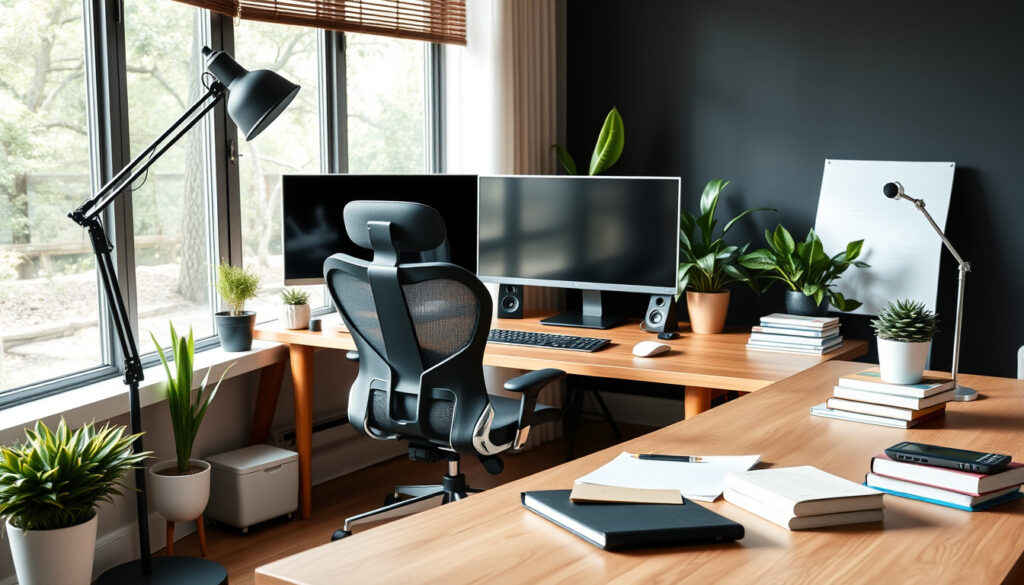
An ergonomic chair matters more than most people realize. WIRED’s workspace configuration guide notes that without proper lumbar support, remote workers often develop back pain within weeks. A mid-range gaming chair or office chair with adjustable armrests hits the sweet spot between comfort and cost.
Lighting and ergonomics
Poor lighting causes eye strain and fatigue. Position your desk perpendicular to windows to avoid screen glare, then supplement with a desk lamp that uses 5000–6500K daylight bulbs. The goal: enough ambient light that you don’t strain to read, but no direct glare on your monitor.
Ergonomics checklist for small spaces:
- Monitor top at or slightly below eye level
- Feet flat on floor, knees at roughly 90 degrees
- Wrists neutral when typing
- Desk depth of at least 24 inches for monitor distance
Tech setup
At minimum, you need a reliable computer and high-speed internet. A wired ethernet connection beats Wi-Fi for video calls, though a dual-band router on the 5GHz band handles most work well. Add a webcam (720p minimum), headset, and possibly a USB hub if your laptop has limited ports.
How do you start your home office?
Setting up a workspace in a small home requires more deliberate planning than a dedicated office room, but the process breaks down into three phases.
Choose location
Look for a corner with natural light and a power outlet nearby. Avoid high-traffic areas where family members or roommates walk through constantly. If your only option is a shared space like a living room corner, consider using a room divider or bookshelf to create a visual boundary.
IKEA’s small-space office planning guide emphasizes that vertical space counts when floor space is limited. A corner unit against two walls holds more than a freestanding desk alone.
Plan layout
Sketch your space before buying anything. Mark the desk position, circulation paths, and storage locations. Brother’s home organization guide suggests keeping daily-use items within arm’s reach and storing less-used supplies in labeled containers on higher shelves.
The catch: a small home office works best when everything has a designated spot. Clutter accumulates faster in compact spaces, so build organization into your plan from day one.
Organize space
- Desk at center of your productive zone
- Storage above and beside, not in front
- Cables routed along walls or through a cable tray
- Daily items on the desk surface; everything else put away
Small spaces punish poor planning. A 5-minute layout sketch before buying furniture prevents the costly mistake of purchasing a desk that doesn’t fit your room’s actual dimensions.
How much does it cost to set up a home office?
Home office costs span a wide range depending on quality expectations and space constraints.
Basic vs premium
A minimal setup—the kind that handles email, video calls, and document work—can cost as little as $500. A premium workspace with a motorized standing desk, high-end ergonomic chair, monitor arm, and premium peripherals can easily hit $2,000 or more.
The difference isn’t in the basics. Both setups need a desk, chair, lighting, computer, and internet. Premium buys you adjustability, durability, and aesthetics.
Budget guide
The table below breaks down typical costs across three budget tiers, helping self-employed workers plan their workspace investment.
| Item | Budget ($) | Mid-range ($) | Premium ($) |
|---|---|---|---|
| Desk | 100–200 | 200–350 | 350–600 |
| Chair | 100–150 | 150–300 | 300–600 |
| Lighting | 30–50 | 50–100 | 100–200 |
| Internet (monthly) | 40–60 | 60–80 | 80–120 |
| Computer | 400–800 | 800–1,500 | 1,500–3,000 |
| Peripherals | 50–100 | 100–250 | 250–500 |
| Total setup | 720–1,260 | 1,310–2,280 | 2,550–5,020 |
The pattern: most of your budget goes to the computer and chair. A $700 laptop and $200 chair outperform a $500 desktop with a $50 task chair for actual work output.
What this means: small-space setups often cost less because they naturally lean toward compact furniture. A corner desk or wall-mounted unit typically costs less than a full-size home office desk.
What are the rules for a home office?
The IRS sets specific eligibility rules for claiming a home office deduction. Understanding these prevents costly errors on your tax return.
IRS requirements
To qualify, your home office must be used regularly and exclusively for business. The space doesn’t need to be a separate room, but it must be a distinct area used for no other purpose. The IRS defines qualifying uses as a principal place of business or a location where you regularly meet clients or customers.
The simplified method was introduced beginning with 2013 tax returns to reduce record-keeping burden for small-space users. For spaces under 300 square feet, the IRS considers this method ideal to minimize administrative complexity.
Self-employed individuals qualify; W-2 employees cannot claim this deduction for tax years after 2017. The deduction is limited to your gross business income minus other business expenses.
Exclusive use
The exclusive use rule is strict. If your kids use your home office for homework while you’re on a call, the IRS may consider that a personal use that disqualifies your deduction for that time period. Daycare providers have an exception to this rule because their business use inherently involves others in the space.
Records of utility bills, mortgage statements, and home maintenance costs that can be prorated by square footage support your deduction if the IRS audits your return.
The implication: a dedicated corner of a studio apartment with a folding screen or bookshelf partition counts, provided that corner sees no personal use during business hours.
How much can I write off for a home office?
Two methods exist for calculating your home office deduction, and the choice between them depends on your space size, record-keeping capacity, and whether you expect a large deduction. If you’re looking for more information on setting up a home office, including tax tips, check out this guide on crafting netherite armour.
Simplified option
The IRS simplified method applies $5 per square foot of your home used for business, up to a maximum of 300 square feet. This caps your deduction at $1,500 per year. No depreciation or recapture is required when you sell your home, and record-keeping is minimal.
For a 100-square-foot home office, you’d deduct $500. For a 200-square-foot office, $1,000. The math is straightforward: multiply your business-use square footage by $5.
There is no carryover of excess deduction under the simplified method. If your deduction exceeds your business income, you cannot carry the excess forward. The IRS uses average monthly square footage if you start using the space mid-year.
Claimable expenses
Under the regular method, deductible home expenses include real estate taxes, mortgage interest, rent, utilities, homeowners insurance, and HOA fees. Cleaning supplies and home maintenance costs are deductible if they relate to the business portion of your home.
Direct expenses like a fresh coat of paint for your home office or repairs solely for the office space are deducted in full. The regular method requires Form 8829 and involves calculating the business-use percentage as your office square footage divided by your total home square footage.
The trade-off: the regular method requires detailed records and documentation, but it may yield a larger deduction for homeowners with significant mortgage interest and property taxes.
For a self-employed worker with a 200-square-foot apartment using a 120-square-foot office, the simplified method yields a $600 deduction—$5 multiplied by 120. Over three years, that’s $1,800 in tax savings you leave on the table by skipping the deduction.
Pros and cons
Upsides
- Up to $1,500 annual tax deduction for self-employed workers
- Simplified method requires minimal record-keeping
- Available to homeowners and renters alike
- Small-space setups often cost less to furnish
- Decluttering a shared space often boosts productivity
Downsides
- W-2 employees excluded from deduction since 2017
- Exclusive use rule restricts flexibility in shared spaces
- Regular method demands detailed records and receipts
- No carryover under simplified method if income is low
- Deduction capped regardless of actual mortgage costs
The contrast matters most for W-2 employees who were previously eligible: losing the home office deduction after 2017 creates a permanent gap that self-employed workers can still fill.
Steps to set up your home office
Follow this sequence to build a compliant, functional workspace from scratch.
- Assess your space. Measure the area you plan to use. Calculate the square footage. Note any existing furniture that stays.
- Set your budget. Decide on a spending ceiling. Prioritize the chair and desk first; everything else is incremental.
- Select your location. Choose the quietest corner with natural light. Ensure a power outlet is accessible.
- Purchase essentials. Buy a quality ergonomic chair before a fancy desk. The chair affects your daily comfort more than desk features.
- Install lighting. Add a desk lamp with daylight bulbs. Position to eliminate glare on your monitor.
- Configure technology. Connect your computer, test internet speed, set up peripherals. Route cables cleanly.
- Document for taxes. Take photos of your workspace setup. Record the dimensions and any receipts. Note the business-use percentage for your records.
- Maintain exclusive use. Establish a habit: when the workspace is during work hours, it’s only for work.
What experts say
The biggest roadblock to qualifying for these deductions is that you must use a portion of your home exclusively and regularly for your business.
Standard deduction of $5 per square foot of home used for business (maximum 300 square feet).
Employees are not eligible to claim the home office deduction.
— IRS small business newsroom
Related reading: Out of Office Message – Templates and Best Practices
blog.taxact.com, manaycpa.com, hrblock.com, irs.gov, irs.gov, irs.gov, uschamber.com, youtube.com
Beyond equipment costs and IRS rules, many employees can claim work from home tax relief to offset additional household expenses from remote setups.
Frequently asked questions
Is it worth having a home office?
For self-employed workers, yes. Even a modest $500 annual deduction translates to real tax savings over time. The compliance cost is low: you need photos, dimensions, and a consistent use pattern. If your space allows exclusive business use, the deduction is worth claiming.
What expenses can I claim for my home office?
The IRS allows deduction of real estate taxes, mortgage interest, rent, utilities, insurance, and home maintenance costs that apply to your business-use square footage. Supplies, internet service fees, and business-only furniture also qualify as direct expenses.
How to make a home office with no space?
Vertical space is your ally. Mount a fold-down desk on a wall. Use a room divider to section off a corner of a living area. Even a closet converted to a mini-office with a shelf-desk counts, provided the space sees no personal use during work hours.
What are IKEA home office ideas?
IKEA offers modular office solutions designed for small spaces. Their MALM and BEKANT desk lines work in corners and narrow rooms. Pair with a KALLAX shelf unit for vertical storage and a BEKANT screen for visual separation in shared rooms.
Home office vs garden office – which one should you choose?
A garden office adds capital cost and may require permits, but it provides true physical separation from your living space, making the exclusive use rule straightforward to satisfy. An indoor home office costs less and requires no planning permission but demands more discipline around the exclusive use requirement.
What are small home office layout ideas?
L-shaped layouts fit two walls efficiently. Wall-mounted desks free up floor space. placing the desk perpendicular to a window reduces glare while maintaining natural light. Keep circulation paths clear and store supplies within reach but off the desk surface.
What is a small home office pod?
A small office pod is a compact, enclosed workspace unit—often a sound-insulated booth or prefabricated structure. Pods range from single-person phone booths to multi-desk units. They’re designed for apartments and open-plan homes where noise separation matters.
For the self-employed worker in a 700-square-foot apartment running a freelance design business, the choice is clear: carve out one dedicated corner, buy an ergonomic chair and a compact desk, and claim the $600 deduction the IRS allows for a 120-square-foot workspace. The setup cost pays for itself within the first year.
More related posts
 Razer BlackShark V2 Pro 2023: Review, Specs & Comparisons
 What Is a Serif Font? Examples, Types and Best Uses
 Shopify Make a Website: Full Step-by-Step Guide 2026
 LEGO Toys for Girls: Popular Sets, Age Guide & Gift Ideas (2024)
 King’s Birthday Honours NZ 2025: Full List of Recipients & Details
 Herald Quiz Today Morning: Free Daily Trivia Guide
 Chilli Con Carne Recipe: Ingredients, Secrets & Tips
 Huggies Nappy Pants Size 4: Sizing Chart, Weight & Ireland Guide
